| Dear Member,
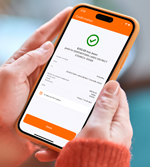
The SBS Mobile app is a simple, secure and convenient way to manage your accounts, from anywhere.
You can check your account balances, transfer funds between your own accounts, make payments to other people and businesses, and set up automatic payments – from home or while you’re on the go. |
| Steps to get convenient, mobile banking:
- Use your device’s app store to download SBS Mobile
- Select Register and use your existing Internet Banking login details
- Follow instructions to link your device to your SBS account
- You’re done! You can now access your banking services, from anywhere.
|
|
| Can we help? Call our Member Outreach team on 0508 548 859, or find step-by-step instructions on our website under Everyday Banking > Internet and Mobile Banking > Mobile App. Kind regards, Shane Evans
General Manager Retail
Member Outreach Team – Contact Centre:
Phone (NZ): 0508 548 859
Phone (overseas): +64 3 213 5233
|
|
 |
| |
| Click here to Unsubscribe. SBS Bank, PO Box 835, Invercargill 9840. Copyright 2026 SBS Bank. All Rights Reserved. SECURITY NOTICE: We will never ask for your internet banking login, password details, security details or any other security details via email. We will never ask you to log into your Personal Internet Banking services via a link in an email. If you are concerned that an email from SBS Bank is not genuine, please call us on 0800 727 2265 or forward it to info@sbsbank.co.nz. |
|
|